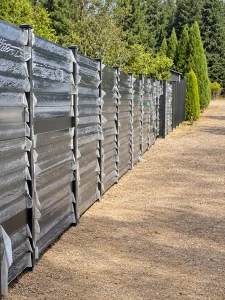
Aluminum Fence Material List: Panels, Posts, Gates & Accessories
A complete aluminum fence material list connects your site drawing to the products being ordered. It identifies each panel, support and connection so the quotation covers a usable project package.
Use this guide and the downloadable Excel template to organize requirements for Wonderful Metal. The template contains editable quantities, spare quantities, supply responsibilities and review fields.
What Should an Aluminum Fence Material List Include?
Start with the complete layout, then work through the components below. Some items may be integrated into an assembly or supplied locally. Identify their status rather than assuming every accessory is included.
| Category | Items to review | Specification to record |
|---|---|---|
| Fence panels | Standard, closing and slope-specific panels | Dimensions, profile, spacing, finish and drawing reference |
| المشاركات | End, intermediate, corner and gate supports | Section, length, mounting and position |
| Connections | Brackets, channels, rails and panel fixings | Type, quantity and what each set contains |
| Post accessories | Caps, base plates, covers and anchors where applicable | Compatibility and whether separate or integrated |
| بوابات | Pedestrian and vehicle gate assemblies | Clear opening, leaf size and operating direction |
| Gate hardware | Hinges, locks, stops and sliding components | Function, set contents and supply responsibility |
| Project extras | Agreed spares, labels and special parts | Quantity, identification and packing requirements |
Explore our aluminum fence systems to select the product family before finalizing the component schedule.
Count Panels by Drawing Reference
Number the fence runs and mark each panel position. Separate repeated dimensions from closing panels, stepped sections and any special shapes.
State whether the listed width is the manufactured panel width, the clear opening between supports or the post-center distance. These dimensions are not interchangeable.
For slat systems, record the direction, profile dimensions, clear gap and finish. A reference photograph helps explain appearance, while the approved drawing defines the purchase.
See the black privacy fence panel as a product reference.

Count Posts by Unique Support Location
Mark every support on the drawing and count each physical post once. Classify it after identifying its location and function.
End & Intermediate Posts
Ends terminate a run; intermediate supports sit between adjacent panels. For an isolated straight run of five panels with one post at each joint and both ends, the count is six posts.
This example assumes no wall attachments, gates or shared supports.
Corner & Gate Posts
Reconcile a corner shared by two runs so it is not counted twice. Check whether a gate support also receives an adjacent fence panel.
Record these functions on the same support reference. Confirm the required section and connection arrangement.
Avoid applying “panels plus one” independently to every segment and adding the results without reviewing shared corners. Existing walls and unusual gate layouts can also change the support count.
Include Connections, Fasteners & Gate Hardware
Count from the Connection Detail
Confirm how each panel connects to its supports. The quantity of brackets or channels depends on the chosen construction, not just the panel count.
Specify the unit clearly. “One set” should identify how many brackets, screws or other parts it contains. If these are already included in a panel kit, identify them as included rather than adding a second separate order.
Check Post Bases and Caps
List caps, covers, base plates and anchors where applicable. Confirm whether base plates are part of the supplied post or separate components. Have the installer verify suitable anchors and foundations for the actual mounting surface.
Give Each Gate Its Own Schedule
Record the clear passage width separately from leaf dimensions. Identify opening direction, hinges, latch or lock, stops and supports. For double gates, review meeting details and any drop bolts or receivers.
For sliding gates, identify the agreed track, rollers, guides and other system parts. List automation and controls separately where required and confirm their supply responsibility.
How to Use the Downloadable Excel Template
- Enter project details. Include your contact, drawing revision, destination and required arrival date.
- Define each specification. Use a separate row for each size, finish or component type. Duplicate rows as necessary.
- Fill quantities. Required quantities and spare quantities are separate inputs. Blank means unconfirmed; zero means a confirmed zero.
- Assign the supplier. Identify factory supply, local installer supply or buyer supply.
- Review inclusions. Mark unused items Not required and resolve any To review entries before ordering.
- Attach the drawings. Email the completed workbook with the matching layout and reference images.
The workbook is a customer-fillable procurement checklist. It does not automatically determine structural sections, foundation dimensions or quantities from a site plan.
Prepare a Complete China Factory Inquiry
A coordinated purchasing schedule helps Wonderful Metal review panels, posts, gates and agreed accessories together. It also makes it easier to compare supplier quotations against the same scope.
For export orders, include packaging, component labels, destination and unloading conditions. Request clear confirmation of freight scope, exclusions, production timing and quotation validity.
- Reconcile every panel and unique support with the drawing.
- Check accessory quantities against the approved assembly.
- Remove duplicate components already included in kits.
- Confirm spare quantities rather than assuming a universal allowance.
- Identify local foundations, anchors and installation work separately.
Discuss custom aluminum fence supply → View project references →
Aluminum Fence Material List FAQs
How many posts do I need?
Count the unique support locations on the approved layout. Check shared corners, gate supports and wall connections before totaling the post schedule.
Are brackets and screws included with panels?
Ask for written confirmation. Different supply formats include different components; describe what each panel or kit contains.
Should I include spare parts?
Discuss suitable spares for your project and record their quantities separately. There is no automatic spare allowance in the template.
Can I use the list for a slope?
Yes. Identify slope-specific panels separately and attach measured levels and the agreed stepped or other panel arrangement.
Can Wonderful Metal quote from the completed workbook?
Submit it with the project drawings and destination. The team can review the requirements and clarify any missing specifications before quoting.
Send Your Complete Fence Requirements
Organize panels, posts, gates and accessories in one schedule, then send Wonderful Metal your workbook and drawings for review.